Last Updated on – 13/05/2026
Changing a Fortnite name is done by updating the player’s Epic Games Display Name through the Epic Games website.
For PC, Nintendo Switch and mobile users, they need to sign in, verify their email, open Account settings, edit the Display Name box and confirm the change.
Epic Games allows this once every 14 days for free. PlayStation and Xbox players may need to change their PSN Online ID or Xbox Gamertag instead.
Key takeaways:
- Fortnite names on PC, Switch and mobile are usually changed through Epic Games.
- The Epic Games Display Name can be changed once every 14 days.
- Email verification may be required before changing the name.
- PlayStation users may need to update their PSN Online ID.
- Xbox users may need to update their Xbox Gamertag.
- Changing a name does not remove skins, V-Bucks or progress.
How Do You Change Your Name in Fortnite Quickly?

The quickest way to change a Fortnite name is to update the Epic Games Display Name from the Epic Games account page. This is the name that usually appears in Fortnite for players using PC, Nintendo Switch or mobile.
Direct Answer for PC, Switch and Mobile Players
To change a Fortnite name on PC, Switch or mobile, the player should:
- Visit the Epic Games website.
- Sign in to the Epic Games account used for Fortnite.
- Verify the account email address if it has not already been verified.
- Open the Account page.
- Go to the General settings tab.
- Find the Display Name box.
- Select the pencil icon next to the current name.
- Enter the new Fortnite display name.
- Confirm the new name.
- Tick the box acknowledging the 14-day cooldown.
- Click Confirm to save the change.
Once confirmed, the new Fortnite name should appear on the account. In some cases, players may need to restart Fortnite before the updated name shows in the lobby, friends list or matches.
Important Note for PlayStation and Xbox Players
For PlayStation and Xbox users, Fortnite may show the console account name instead of the Epic Games Display Name. This means a player may need to change their PSN Online ID or Xbox Gamertag to update the name shown in Fortnite.
A gaming account adviser described this issue clearly:
“I often see players change their Epic Games Display Name and then wonder why nothing changes on console. I always explain that the account name shown in Fortnite depends on how the console account is linked and which platform name is being displayed.”
What Is a Fortnite Display Name?
A Fortnite display name is the public name other players see in Fortnite. It can appear in the lobby, friends list, party chat, elimination feed and match results. For many players, this name comes from their Epic Games account.
However, Fortnite is played across multiple platforms, and the name system can vary depending on the device. A PC player may see their Epic Games Display Name, while a PlayStation player may see their PSN Online ID. An Xbox player may see their Xbox Gamertag.
This is why the question “how do you change your name in Fortnite?” does not always have one single answer for every platform. The correct method depends on where the player plays Fortnite and which account name is being displayed.
How Do You Change Your Fortnite Name Through Epic Games?
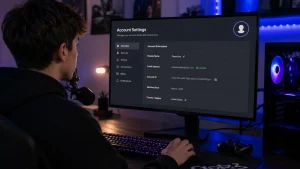
For most PC, Switch and mobile players, changing a Fortnite name through Epic Games is the main method. The process is simple, but the account must be accessible and the email address should be verified.
Verify the Epic Games Email Address
Before changing the Fortnite display name, the player should make sure their Epic Games email address is verified. If the email is not verified, some account features may be restricted.
The verification email usually comes from Epic Games and includes a link or button to confirm the address. Players should only use official Epic Games emails and avoid clicking suspicious links from unknown senders.
Open the Epic Games Account Page
After signing in, the player should open the Epic Games Account page. This is where personal details, security settings, connected accounts and display name information are managed.
The General tab is usually the place where the Display Name box appears. This is the setting that controls the Epic Games name used across Fortnite and other Epic services.
Edit the Display Name Box
The player needs to select the pencil icon beside the Display Name box. They can then enter a new Fortnite display name. The name should be checked carefully before saving because it cannot be changed again immediately after confirmation.
A good Fortnite username should be easy to remember, not too long and suitable for public gaming spaces. Players should avoid names that include private information, offensive wording or anything they may regret later.
Confirm the 14-Day Cooldown
Epic Games allows a display name change once every two weeks. After changing the name, the account enters a 14-day cooldown period. During that time, the player cannot update the Epic Games Display Name again.
This is important because even a small spelling mistake may stay visible until the cooldown ends.
Fortnite Name Change Method by Platform:
| Platform | Name Usually Changed Through | Free or Paid? | Main Thing to Know |
| PC | Epic Games Display Name | Free | Can usually be changed once every 14 days |
| Nintendo Switch | Epic Games Display Name | Free | The Epic account name often controls the Fortnite name |
| Mobile | Epic Games Display Name | Free | Players may need to restart the app after changing it |
| PlayStation | PSN Online ID or Epic Games account | May vary | Fortnite may display the PSN name |
| Xbox | Xbox Gamertag or Epic Games account | May vary | Fortnite may display the Xbox Gamertag |
How Do You Change Your Fortnite Name on PC?
To change a Fortnite name on PC, the player usually needs to update the Epic Games Display Name. PC players commonly launch Fortnite through the Epic Games Launcher, so their Fortnite name is strongly connected to their Epic account.
The player should sign in to the Epic Games website with the same account used in the Epic Games Launcher. After opening the Account page, they can edit the Display Name under the General tab and confirm the change.
After completing the process, the player should close and reopen Fortnite. This helps the new Fortnite username appear properly in the lobby and online areas.
PC players should also make sure they are changing the correct Epic Games account. Some users accidentally create more than one Epic account, especially if they have played Fortnite on console before. If the wrong account is edited, the Fortnite name may not change on the account they actually use.
How Do You Change Your Fortnite Name on Nintendo Switch?
Nintendo Switch players usually change their Fortnite name through the Epic Games account connected to Fortnite. This means the player should log in to the Epic Games website using the account linked to their Nintendo Switch Fortnite profile.
Once logged in, the player can go to Account settings, edit the Epic Games Display Name and confirm the update. The change may not always appear instantly on the Switch, so restarting Fortnite is a useful step.
If the player does not know which Epic account is linked to the Nintendo Switch, they may need to check the connected accounts section on Epic Games. The Nintendo account should be linked there if everything is set up correctly.
For younger players, parents or guardians may also need to check account permissions. Some child accounts may have restrictions that affect account changes, communication settings or display options.
How Do You Change Your Fortnite Name on Mobile?
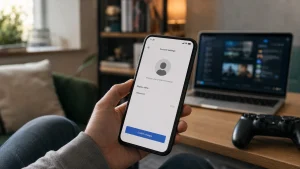
Mobile players can usually change their Fortnite name by editing the Epic Games Display Name. The process is similar to PC and Switch because the name is controlled through the Epic Games account.
The player should open a browser, visit the Epic Games website, sign in, go to Account settings and update the Display Name. Once confirmed, the player can reopen Fortnite on mobile and check whether the new name appears.
Mobile users should be careful when typing the new name on a small screen. Autocorrect can change spelling, add spaces or replace words unexpectedly. Since the Epic Games name change cooldown lasts 14 days, it is worth checking the name twice before confirming.
A Fortnite community moderator explained the issue this way:
“I always tell players to type the name slowly and check every character before confirming it. I have seen many people get stuck with a typo for two weeks because they rushed the final step.”
How Do You Change Your Fortnite Name on PlayStation?
Changing a Fortnite name on PlayStation can depend on whether Fortnite is showing the Epic Games Display Name or the PSN Online ID. Many PlayStation users see their PSN Online ID in Fortnite, which means the name must be changed through PlayStation account settings.
PSN Online ID and Fortnite Name
The PSN Online ID is the public PlayStation username. If Fortnite is displaying this name, changing the Epic Games Display Name may not update what appears in-game on PlayStation.
In that case, the player needs to change the PSN Online ID through Sony’s account settings. This may affect how the name appears across PlayStation games and services, not just Fortnite.
Things to Check Before Changing a PSN ID
Before changing a PSN Online ID, the player should understand that the change may affect more than Fortnite. Some games and services may display the new ID differently, and Sony may apply its own rules or conditions.
Players should check:
- Whether the current Fortnite name is the PSN ID or Epic Games Display Name
- Whether the PSN Online ID change is free or paid for that account
- Whether the new name follows PlayStation naming rules
- Whether the player is comfortable using the new name across PlayStation services
How Do You Change Your Fortnite Name on Xbox?
On Xbox, Fortnite may display the Xbox Gamertag instead of the Epic Games Display Name. If that is the case, the player needs to change their Xbox Gamertag through Microsoft account settings.
Xbox Gamertag and Fortnite Display Name
The Xbox Gamertag is the public name connected to an Xbox account. If Fortnite uses this name, editing the Epic Games Display Name may not change the name seen by other Fortnite players on Xbox.
The player should check whether the Fortnite name matches their Xbox Gamertag. If it does, the Xbox name is likely the one that needs to be changed.
Possible Xbox Gamertag Costs
Microsoft may allow some Gamertag changes for free, but additional changes may involve a cost depending on the account and region. Because of this, Xbox players should check Microsoft’s official settings before confirming a name change.
The player should also remember that a new Xbox Gamertag can affect their identity across Xbox services, not only Fortnite.
Why Can’t a Player Change Their Fortnite Name?

A player may be unable to change their Fortnite name for several reasons. The most common reason is the 14-day cooldown on Epic Games Display Name changes. If the name was recently updated, the player must wait until the cooldown ends.
Another common issue is an unverified email address. Epic Games may require the account email to be verified before allowing certain account changes.
Other possible reasons include:
- The player is signed in to the wrong Epic Games account.
- The Fortnite name is controlled by PSN or Xbox instead of Epic Games.
- The chosen name is already restricted or not allowed.
- The account has parental controls or child account limits.
- There is a temporary account or server issue.
- The display name box is unavailable because of account security settings.
If a player cannot change the name after checking these points, they may need to review the official Epic Games support guidance.
How Often Can You Change Your Fortnite Name?
Epic Games Display Names can usually be changed once every 14 days. This means the player must wait two weeks before making another Fortnite name change through Epic Games.
The cooldown exists to reduce confusion, prevent misuse and keep account identities more stable. Without a cooldown, players could change names constantly, making it harder for friends, teammates and support teams to recognise accounts.
This is why players should choose a Fortnite username carefully. A rushed name, joke name or misspelt name may be stuck on the account until the waiting period ends.
Console name changes follow different rules. PlayStation and Xbox may have their own limits, costs and naming policies, so players should check the relevant platform before making changes.
What Should Players Know Before Choosing a New Fortnite Username?
A new Fortnite username should be safe, clear and suitable for online play. Fortnite is a public multiplayer game, so the name may be visible to strangers, friends, streamers and other players.
Username Rules and Safety
Players should avoid names that include offensive language, harassment, impersonation or anything that breaks platform rules. A name that violates rules may be changed, restricted or reported.
A safer Fortnite display name usually uses neutral wording, gaming references, initials, numbers or creative spellings without revealing personal information.
Avoiding Personal Information
Players should not include private details in a Fortnite name. This includes full names, addresses, phone numbers, school names, birthdays or personal social media handles.
For younger UK players, this is especially important. Parents and guardians should encourage usernames that protect privacy while still feeling fun and personal.
Picking a Name That Works Across Platforms
A player may use Fortnite on more than one device. Choosing a name that works across PC, console, Switch and mobile can help keep the account identity consistent.
Good Fortnite username ideas are often:
- Easy to read
- Short enough to remember
- Not too similar to famous creators
- Free from private information
- Suitable for long-term use
- Simple enough for friends to search
Does Changing an Epic Games Name Affect Fortnite Friends and Progress?
Changing an Epic Games Display Name should not remove Fortnite progress. Skins, emotes, V-Bucks, Battle Pass progress, account level and friends should remain linked to the same Epic Games account.
The name is only the public display identity. It does not create a new Fortnite account, reset progress or delete purchases.
However, friends may need a moment to recognise the new name. If a player changes their Fortnite username completely, friends may not immediately know who they are. It can be useful to let regular teammates know before or after the change.
Players should also avoid unlinking accounts unless they fully understand the consequences. Changing a display name is very different from disconnecting a console account from Epic Games.
What Is the Difference Between an Epic Games Display Name, PSN ID and Xbox Gamertag?
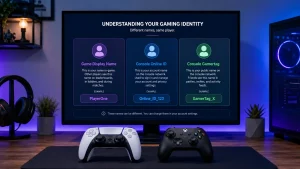
The Epic Games Display Name is the public name linked to an Epic Games account. It is commonly used for Fortnite on PC, Nintendo Switch and mobile.
A PSN Online ID is the public username for a PlayStation account. If Fortnite displays the PSN ID, the player may need to change their PlayStation name instead of their Epic Games Display Name.
An Xbox Gamertag is the public username for an Xbox account. If Fortnite displays the Xbox Gamertag, the player may need to change the Xbox name through Microsoft.
The difference matters because changing the wrong name may not update Fortnite. A player could change their Epic Games Display Name successfully, but still see the old name on PlayStation or Xbox if the console ID is the name being shown.
Is Changing a Fortnite Name Free?
Changing an Epic Games Display Name is free. Epic Games usually allows the change once every 14 days at no cost.
For console players, the cost depends on the platform. PlayStation and Xbox have their own account name systems, and fees may apply depending on the account history and platform policy. This is why console players should check Sony or Microsoft guidance before changing a PSN Online ID or Xbox Gamertag.
The safest free route for PC, Switch and mobile players is to use the Epic Games website and update the Display Name there.
What Are the Key Steps to Change a Fortnite Name?
The key steps depend on the platform, but the general process is easy once the player knows which account controls the displayed name.
For PC, Switch and mobile, the player should:
- Log in to Epic Games.
- Verify the email address.
- Open Account settings.
- Edit the Display Name.
- Confirm the new name.
- Accept the 14-day cooldown.
- Restart Fortnite and check the update.
For PlayStation, the player should check whether Fortnite is showing the PSN Online ID. If it is, the name may need to be changed through PlayStation settings.
For Xbox, the player should check whether Fortnite is showing the Xbox Gamertag. If it is, the name may need to be changed through Microsoft account settings.
In simple terms, the answer to “how do you change your name in Fortnite?” is this: change the Epic Games Display Name for PC, Switch and mobile, but check the console account name for PlayStation and Xbox.
Conclusion
Changing a Fortnite name is straightforward when the player uses the right account settings. For most PC, Nintendo Switch and mobile users, the correct method is to update the Epic Games Display Name through the Epic Games website. The account email should be verified first, then the player can edit the Display Name box and confirm the change.
The most important rule is the 14-day cooldown. Once the new Fortnite name is confirmed, it cannot usually be changed again for two weeks. Players should check spelling, avoid private information and choose a name they are happy to use in public matches.
For PlayStation and Xbox users, the Fortnite name may be linked to the PSN Online ID or Xbox Gamertag. In those cases, changing the Epic Games Display Name may not be enough. The player may need to update the console username through Sony or Microsoft instead.
Overall, the best way to avoid problems is to identify which account name Fortnite is displaying, change the correct username and confirm the new name carefully.
FAQs
Can a Fortnite name be changed without logging into Epic Games?
A Fortnite name usually cannot be changed without logging into the account that controls the displayed name. For PC, Switch and mobile players, this usually means signing in to Epic Games. For console players, it may mean signing in to a PlayStation or Xbox account.
Why is the Fortnite display name greyed out?
The Fortnite display name may be greyed out if the account is still in the 14-day cooldown period, the email address is not verified, or the player is not signed in to the correct Epic Games account. Account restrictions or parental controls may also affect changes.
Will changing a Fortnite name remove skins or V-Bucks?
Changing a Fortnite name should not remove skins, V-Bucks, emotes, Battle Pass progress or account levels. These items are linked to the Fortnite account, not just the public display name.
Can two Fortnite players have the same display name?
Epic Games display name rules may prevent identical or restricted names in some cases. If a chosen name is not available or not allowed, the player will need to try a different version, spelling or number combination.
Does a Fortnite name change appear immediately?
A Fortnite name change may appear quickly, but it is not always instant on every device. Restarting Fortnite, signing out and signing back in, or waiting a short time can help the updated name appear correctly.
Can a child account change its Fortnite display name?
A child account may have restrictions depending on parental controls, account settings and platform rules. A parent or guardian may need to manage the account or approve changes before the Fortnite display name can be updated.
What happens if the wrong Fortnite name is entered?
If the wrong Fortnite name is entered and confirmed through Epic Games, the player may need to wait 14 days before changing it again. This is why checking spelling, numbers and spacing before confirmation is very important.